In this article, I’ll explain the architecture of the Real-Time Object Detection monitoring system I designed, what decisions I made, why I made them, and how I did the testing, which is also very interesting.
Below is my stack and how the components interact with each other.
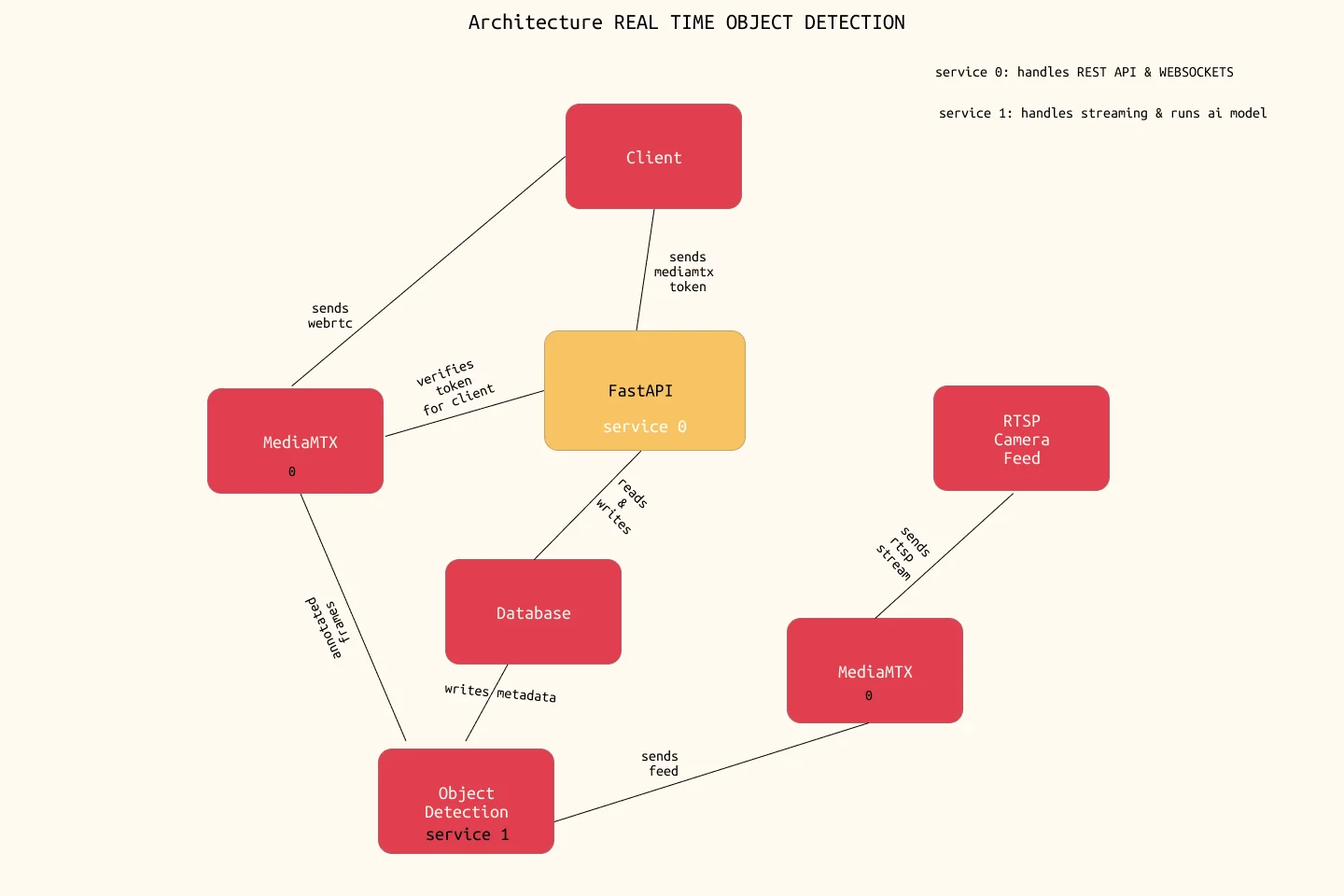
Let’s start from the beginning.
First Phase
First there was Light.
I mean the Security Camera. It uses a protocol called ‘RTSP’, which MediaMTX uses to take in the feed and transport it to our service 1.
I’ve kept it this way because I can change streams without changing the backend code itself.
My MediaMTX server can handle different formats by itself, so the backend doesn’t have to change its services based on a new camera.
service 1 takes in the feed, divides it into frames, runs object detection models on it, and passes it back to MediaMTX, which hosts it for our client to see.
Second Phase
Data is the king.
The database is of utmost importance in this project as it facilitates the reading and writing of the metadata coming from our model, so I kept it very modular, just as I did with my other services.
Here’s a glimpse of the table design:
CREATE TABLE public.count_windows (
    id UUID PRIMARY KEY,
    source CHARACTER VARYING(255) NOT NULL,
    item_class CHARACTER VARYING(100) NOT NULL,
    count INTEGER NOT NULL,
    window_start TIMESTAMP WITH TIME ZONE NOT NULL,
    window_end TIMESTAMP WITH TIME ZONE NOT NULL,
    created_at TIMESTAMP WITH TIME ZONE NOT NULL DEFAULT CURRENT_TIMESTAMP,
    -- Composite unique constraint guarantees no duplicate overlapping reporting
    -- for the same camera source and specific item classification
    CONSTRAINT uq_count_windows_source_item_class_window
        UNIQUE (source, item_class, window_start, window_end)
);
- source: I can mention different sources for adding multiple streams.
- item_class: Different types of objects that our object detection model detects.
- count: From the tracking, it counts the detected objects.
- window_start / window_end: Counts in a specified interval. The smaller the interval, the more data to plot, but it uses up more memory, and vice versa.
Third Phase
This is what the user ends up seeing; it combines everything so far for the client.
FastAPI (service 0) reads the data inserted by service 1 and sends it to the client via WebSockets.
Because I’ve kept the object detection model small, both the stream and the WebSockets are instantaneous.
The MediaMTX stream is encrypted by our backend, so only those who are authorized can view that stream.
And voilà! We have our real-time monitoring system.
Problèmes
Since I’ve build such a large system, I faced a lot of bottlenecks. Here are few below:
latency issues: I faced this a lot earlier, turning down the camera quality(1440p-720p) helped a ton. I started using yolov8n models and basically most of the issues disappeared.
frequest reconnecting: So earlier, I was writing everything in a
jsonfile. But that become a problem quickly, because windows many of the threads were trying to write in json file at the same time which made my entire process restart, hence frequent reconnecting issues with camera.finding bottlenecks itself: One of the hardest parts wasn’t fixing the issues, but actually discovering where they were happening.
To solve this, I created a customStreamProfilersystem that tracked:- frame processing times
- encoding latency
- queue depth
- frame drops
- RTP payload fragmentation
- FPS gate skips
This helped me identify problems such as:
- YOLO inference exceeding frame budgets
- queue overflows causing frame overwrites
- payload fragmentation increasing stream overhead
- processing stages dominating total latency
For example, in one profiling session:
- YOLO tracking alone consumed
60ms - total frame processing reached
72ms - while the target frame budget was only
50msfor20 FPS
The profiler also detected queue overflows and fragmented RTP packets automatically, making it much easier to understand why the stream degraded under load.
Without profiling, debugging real-time systems becomes mostly educated guessing.
Extensive Modular Design
This is where MediaMTX really shines. Not only does it handle the protocol, but it can also handle multiple streams and multiple cameras. So, the design becomes much more extensible with almost no effort.
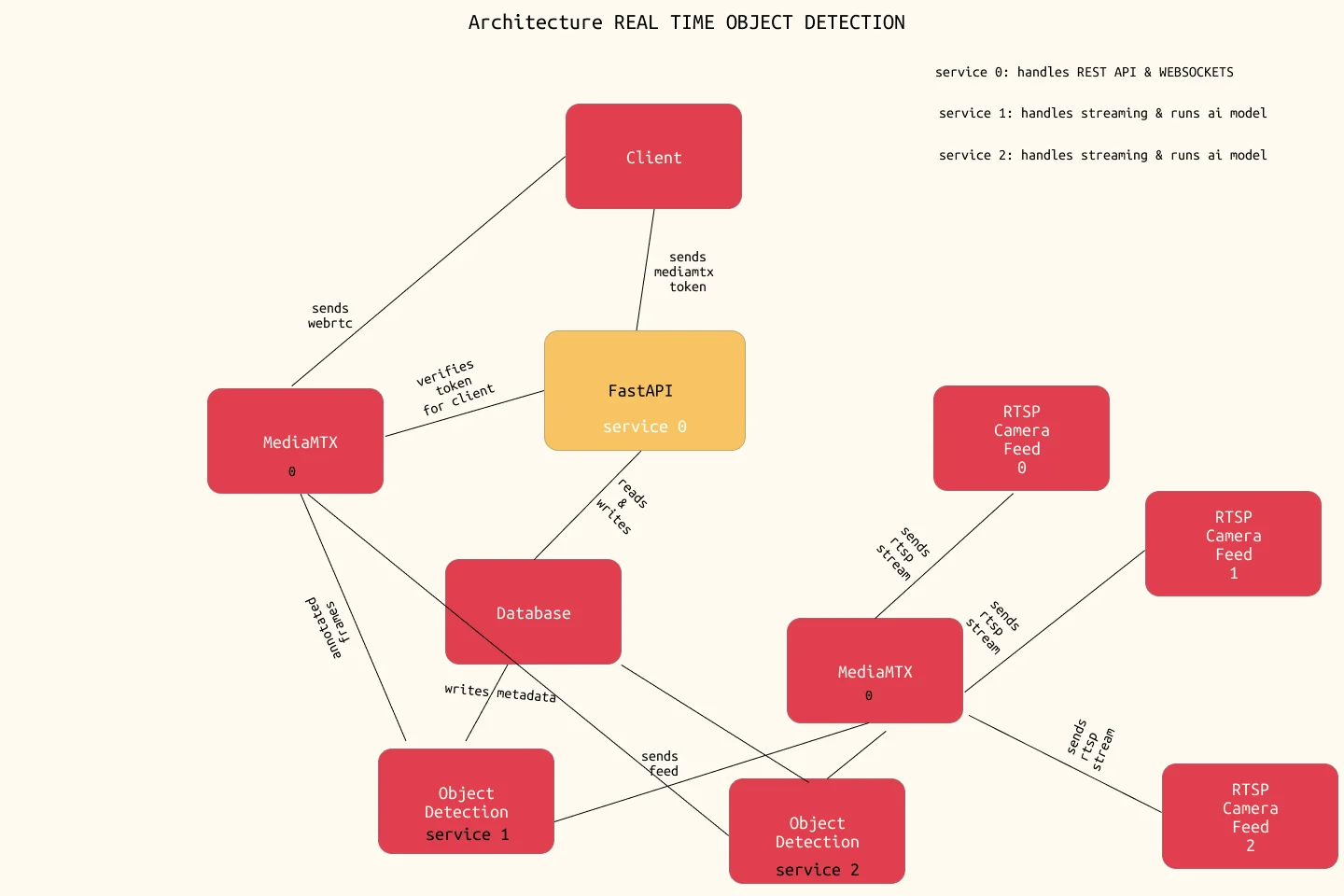
As you can see in the image, there are multiple streams and multiple Object Detection models.
This really helps, as I can run multiple small streams and models on a single system.
The networking bit gets even better, especially when we talk about deployment. This is where we might require a TURN server so that MediaMTX can properly deliver video, though we won’t dive into that here.
Testing the System
For testing the system, I created artificial RTSP servers using ffmpeg, which looped through our existing testing and validation data and fed it directly to MediaMTX.
So, instead of using actual live data—which takes time to set up and requires physical presence—this eased the process, allowing us to test out the entire backend system and its integration.
Conclusion
This took me quite some time to make, and I hope you enjoyed reading it as much as I did writing it. If you’ve got any more questions, feel free to DM me on my socials.